Razer Tartarus Pro (Rapid Trigger)
INFINITE COMMANDS
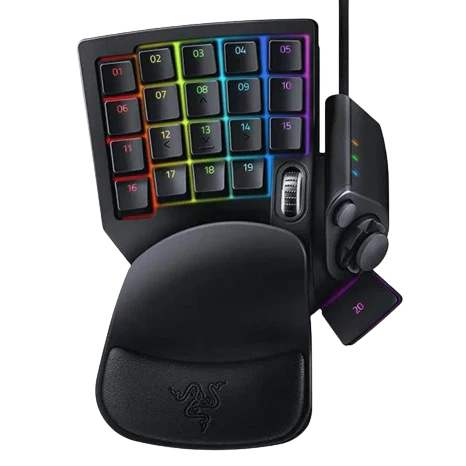
Take hold of your game with the Razer Tartarus Pro—a gaming keypad that will never let victory escape your grasp. From its measured, nuanced inputs to its 32 programmable keys, experience a level of control and customization made for the most demanding of MMO gamers.
RAZER ANALOG OPTICAL SWITCH

While most gaming keypads and keyboards register a singular input when pressing a key, the Razer Tartarus Pro is fitted with Razer Analog Optical Switches which can register scaling levels of input in the same motion depending on how far you press. This allows for a more measured and nuanced form of control.
For example, a half press will cause your character to walk, while a full press will get them to run. This type of control is similar to how you might move your character using analog thumbsticks on a controller.
Rapid trigger mode
Instead of a fixed reset point, keys reset instantly with an upward motion as low as 0.1 mm. This allows for faster repeated keystrokes compared to standard keyboards, which significantly enhances in-game responsiveness.
Adjustable Actuation
Supporting a range of actuation from 1.5 to 3.6 mm, customize the switches to be as sensitive as you want and achieve a setting that best suits your playstyle.
DUAL-FUNCTION KEYS
As a direct benefit of having scaled inputs from Razer Analog Optical Switches, you can now bind two functions to each key—one that triggers on a partial keystroke, and another on a full keystroke.
32 PROGRAMMABLE KEYS
Never run out of room for your macros or keybinds, and add a new dimension to your PC gaming with an 8-way directional thumbpad that can be assigned for navigation or even more commands.
UNLIMITED MACRO LENGTH AND 8 QUICK-TOGGLE PROFILES
Make your skill rotations and gameplay more efficient with the freedom to devise advanced macros, and prepare the perfect setup for any boss encounter with a collection of stored profiles—8 of which can be toggled on the fly using a button on the side of the gaming keypad.
Informations sur le produit
Informations sur le produit
Livraison et retours
Livraison et retours
Description
INFINITE COMMANDS
Take hold of your game with the Razer Tartarus Pro—a gaming keypad that will never let victory escape your grasp. From its measured, nuanced inputs to its 32 programmable keys, experience a level of control and customization made for the most demanding of MMO gamers.
RAZER ANALOG OPTICAL SWITCH
While most gaming keypads and keyboards register a singular input when pressing a key, the Razer Tartarus Pro is fitted with Razer Analog Optical Switches which can register scaling levels of input in the same motion depending on how far you press. This allows for a more measured and nuanced form of control.
For example, a half press will cause your character to walk, while a full press will get them to run. This type of control is similar to how you might move your character using analog thumbsticks on a controller.
Rapid trigger mode
Instead of a fixed reset point, keys reset instantly with an upward motion as low as 0.1 mm. This allows for faster repeated keystrokes compared to standard keyboards, which significantly enhances in-game responsiveness.
Adjustable Actuation
Supporting a range of actuation from 1.5 to 3.6 mm, customize the switches to be as sensitive as you want and achieve a setting that best suits your playstyle.
DUAL-FUNCTION KEYS
As a direct benefit of having scaled inputs from Razer Analog Optical Switches, you can now bind two functions to each key—one that triggers on a partial keystroke, and another on a full keystroke.
32 PROGRAMMABLE KEYS
Never run out of room for your macros or keybinds, and add a new dimension to your PC gaming with an 8-way directional thumbpad that can be assigned for navigation or even more commands.
UNLIMITED MACRO LENGTH AND 8 QUICK-TOGGLE PROFILES
Make your skill rotations and gameplay more efficient with the freedom to devise advanced macros, and prepare the perfect setup for any boss encounter with a collection of stored profiles—8 of which can be toggled on the fly using a button on the side of the gaming keypad.